Higher Order Functions & Array Methods in JavaScript
Learn to manipulate an array like a pro, more efficiently and with cleaner syntax.

I'm a software developer based in Nigeria. I specialise in building web applications. I find both front-end and back-end development interesting and fun. I enjoy building things that live on the internet, whether it's a website or an application. I'm passionate about creating innovative solutions and exploring new technologies. I always seek new challenges and opportunities to grow as a developer. I'm open to new opportunities and collaborations.
Using for and while loops are kinda outdated. It can get bloated and messy especially when dealing with large programs giving room for bugs to hide, it can be restricting and it is SLOW because it has to read the length of the entire array at every iteration of the loop. And it comes, drum roll, please... Higher Order Array Methods to the rescue.
Summary
We will learn to use Higher Order Functions to interact with an Array. I'll give examples of how it might be done in ES5, and then how it will be done in ES6 using the arrow function.
Prerequisite
You should be familiar with functions, arrays and loops in JavaSript.
Higher Order Functions
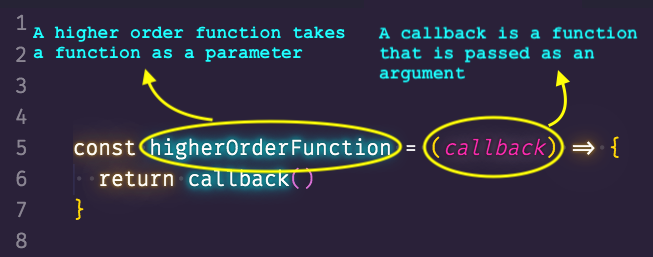
Higher order functions operate on other functions, either by receiving them as arguments or by returning them. It is a function that accepts a function as a parameter or returns a function as the output. It is important to note that these methods are ES6 syntax so let's familiarize ourselves with how they work. If you were defining a function in ES5, it would look like this:
function sum(a, b) {
   return a + b
}
With the introduction of Arrow functions in ES6, the above code will look like this:
const sum = (a,b) => a + b;
ES6 has 'syntactic sugar' which is a fancy way of saying it makes syntax easier to read and express. It makes the language "sweeter" for human use: things can be expressed more clearly, more concisely, or in an alternative style that some may prefer. When dealing with one parameter and/or simple logic, there is no need for the parenthesis or return keyword:
//ES5 syntax
function square(num) {
   return num * num
};

//ES6 syntax
const square = num => num * num;
Also,
//ES5 syntax
function averageOfThree (a, b, c) {
    var sum = a + b + c;
    return sum / 3;
};

//ES6 syntax
const averageOfThree = (a, b, c) => ((a + b + c) / 3)
Both codes will evaluate the same result. With that out of the way, let's see the Array methods.
Array Methods
We are going to be looking at the following Array methods. These are some of the commonly used ones:
forEach()
filter()
map()
sort()
reduce()
Array.prototype.forEach
syntax: array.forEach(callback)
This is one of the simplest functions you are going to use while working with Arrays. The forEach() method is similar to the for(let i = 0; i < array.length, i++){} syntax. It loops through the array and runs the given callback for each of the elements of the array. The callback function passed to the forEach() function can accept the current item, index, and array. Let's create an array, like so:
const ages = [33, 12, 20, 16, 5, 54, 21, 44, 61, 13, 15, 45, 25, 64, 32];
In ES5 if you wanted to loop through the array, you would have something like this:
for (let i =0; i < ages.length; i++){
   console.log(ages[i]);
}
Using the forEach() method would be like this:
ages.forEach(function(age, index, ages){
   console.log(age, index, ages)
}
And we could simply the code further by using the ES6 arrow function:
ages.forEach((age, index, ages) => console.log(age, index, ages)
All the code blocks do the same thing but the ES6 arrow function gives you a clean one-liner.
Array.prototype.filter
syntax: array.filter(callback)
The filter() function is what you'd use if you're looking to 'filter out' or select an item from a given list of items, for example when using a search bar. The filter() method creates a new array by executing the passed callback on every array element and keeps it in the resulting array IF and ONLY IF the element passes the Boolean test returned by the callback. The callback passed into the filter() method accepts any of the three arguments: item, index and array; the same as the forEach() method. for example, let's say we want to get the ages above 20 from our array to create a list of people who can order alcoholic drinks at a bar. Let's use the ES5 syntax first:
//create
let canDrink = [];
for (let i = 0; i < ages.length; i++){
   if(ages[i] >= 20){
      canDrink.push(ages[i]);
   }
}
console.log(canDrink);
Using the filter() method:
const canDrink = ages.filter(funtion(age) {
   if(age >= 21){
      return true;
   }
}
console.log(canDrink);
And below is the ultimate ES6 one-liner:
const canDrink = ages.filter(age => age >= 20);
console.log(canDrink);
Array.prototype.map
syntax: array.map(callback)
The map() method transforms an array by applying a function to all of its elements and building a new array from the returned values. The new array will have the same length as the input array, but its content will have been mapped to a new form by the function. The callback also takes in the current item, index and array. Here is an example:
const companies = [
    {name: 'Company One', type: 'Retail', owner: 'John Doe'},
    {name: 'Company Two', type: 'Auto', owner: 'Jane Doe'},
    {name: 'Company Three', type: 'Tech', owner: 'James Doe'},
    {name: 'Company Four', type: 'Construction', owner: 'Janet Doe'},
    {name: 'Company Five', type: 'Pharmaceutical', owner: 'Julian Doe'},
    {name: 'Company Six', type: 'Publishing', owner: 'Jasmine Doe'},
    {name: 'Company Seven', type: 'Electrical', owner: 'Jacob Doe'}
];
const companyName = companies.map(company => company.name);
console.log(companyName);
The above example will return an array of only the company names. The original has to be mutated or mapped into a new one. The map() method is similar to forEach() and could be used interchangeably for most applications but remember that map() returns a new array.
Array.prototype.sort
syntax: array.sort(callback)
The sort method is self-explanatory: it "sorts" an array in place and returns a sorted array. The default sort order is ascending. In place means that the original array is changed and the same reference to the array is returned. Note that, if the original array is already sorted, then originalArray === newArray. It takes a callback function that specifies the criteria for sorting. Let's sort the ages array:
const ages = [33, 12, 20, 16, 5, 54, 21, 44, 61, 13, 15, 45, 25, 64, 32];
const sortedAges = ages.sort()
console.log(sortedAges);
Now you'll notice that you get something like this:
[12, 13, 15, 16, 20, 21, 25, 32, 33, 44, 45, 5, 54, 61, 64]
We expect the sort() method to sort the array in ascending order but 33 is coming before 5. Here's why: sort() assumes that all the array elements are String by default, and sorts the elements based on the UTF-16 code values, in case it is not passed any callback. This is why 33 will come before 5. So, we need to pass in sorting criteria as a callback function:
const sortedAges = ages.sort((a, b) => a - b);
console.log(sortedAges);
This is better now, isn't it? We told the function to evaluate 2 values and return their results. So:
If
callback(a, b)returns less than 0, a comes before b.If
callback(a, b)returns 0, a and b are left at their current index.If
callback(a, b)returns greater than 0, b comes before a Note that callback(a, b) must always return the same value when given a specific pair of elements a and b as its two arguments. And if you want to return the values in descending order, all you have to do is change the sorting criteria like so:
const sortInDescending = ages.sort((a, b) => b - a;
console.log(sortInDescending);
Array.prototype.reduce
syntax: array.reduce()
The reduce() method is especially useful whenever you need to compute a single value based on the data stored in an array. As the name suggests, this reduces an array into a single value but can get quite complicated. The callback function that this method accepts, works on each element of the array in a way that reduces the array to a single value. The reduce() function itself takes two inputs: (a) the reducer function or callback; and (b) an optional starting point or initial value. The callback function(or reducerCallback) accepts 4 arguments: accumulator, current item, index, and array. Let's see a simple example using the for loop:
let sumOfAges = 0;
for(let i = 0; i < ages.length; i++){
   sumOfAges += ages[i];
}
console.log(sumOfAges);
The code above should return 460. Now using the redue() method:
const sumOfAges = ages.reduce(function(total, age){
    return total + age;
}, 0)
console.log(sumOfAges);
The above is as messier, if not messier, than the for loop. Now the legendary ES6 one-liner:
const sumOfAges = ages.reduce((total, age) => total + age, 0);
console.log(sumOfAges);
In the code above the accumulator is total, the current item is age, the initial value is 0. The basic idea is that the value in accumulator is persisted each time the callback method is executed. This means that if the reducerCallback is executed for the 2nd element of ages, then the values of the arguments accumulator and current are 33 and 12 respectively. The callback then adds these two values and returns them. This returned value is now the new value stored in accumulator. So, for the 3rd callback execution, the values of accumulator and current are 45 and 20. You can see how the array’s values are being used to get to a single value. Remember the second argument called initialValue in the syntax. This is set as the initial value of the accumulator variable. In case you do not specify anyinitialValue argument, accumulator will take the array element at the 0th index as its default initial value.
Conclusion
I know all this is a massive of information to digest at once but on the bright side, now you can start writing your higher-order functions to deal with arrays. There are loads of others, but essentially, you need not know every method in Array.prototype to work with arrays. Thank you for reading this article, I hope you enjoyed it. Any feedback will be much, much appreciated: good or bad ;)
External Resources
JavaScript Higher Order Functions & Array - Brad Traversy https://youtu.be/rRgD1yVwIvE
MDN Docs https://developer.mozilla.org/en-US/docs/Web/JavaScript/Reference/Global_Objects/Array